
You have a company domain. You want a few useful facts about that company. People Data Labs, or PDL, can match that input to a record. This is called enrichment.
A local command gives an AI agent a clear way to do that work. You can review the code once, run it yourself, and ask either agent to use the same files. Start with fake data. Add access only when the boundary is clear.
Put a small tool between the agent and the API
The agent chooses a task. The script controls what can run. PDL’s official Python SDK, a library for calling its API, handles the request format.
- RequestCodex or Claude
Ask for one company or person example.
- ControlYour local script
Choose the mode. Limit the request. Keep only named fields.
- ResultSmall JSON output
Review the data before it goes anywhere else.
Default: the script reads a local fixture. Optional: after approval, the SDK makes one sandbox request. The key enters the script directly, outside chat.
This is a command-line tool, or CLI. There is no server to host and no MCP setup. The working folder stays on your computer.
What was tested: the offline CLI ran in Codex. Tests exercised the installed PDL SDK with HTTP intercepted before it reached the network. No key was read and no PDL API call was made. The sandbox path and Claude Code handoff still need an end-to-end test.
Install the starter in a private folder
You need Python 3.10 or newer. This guide’s local tests used Python 3.13 and PDL SDK 6.4.0. The version pin makes the example easier to repeat.
Download these three files into a new local folder, outside a public site or shared drive:
- pdl_demo.py, the reviewed starter.
- synthetic.json, the invented company and person records.
- requirements.txt, the SDK version.
Open a terminal in that folder. A virtual environment keeps this project’s Python packages together:
python3 -m venv .venv
.venv/bin/python -m pip install -r requirements.txt
.venv/bin/python pdl_demo.py company
The installation uses the internet to download packages. The last command reads only the local fixture. It needs no API key.
Prove the path with invented data
The company fixture contains the same record twice. The script uses its ID to keep one copy, then selects four fields. It makes zero API calls.
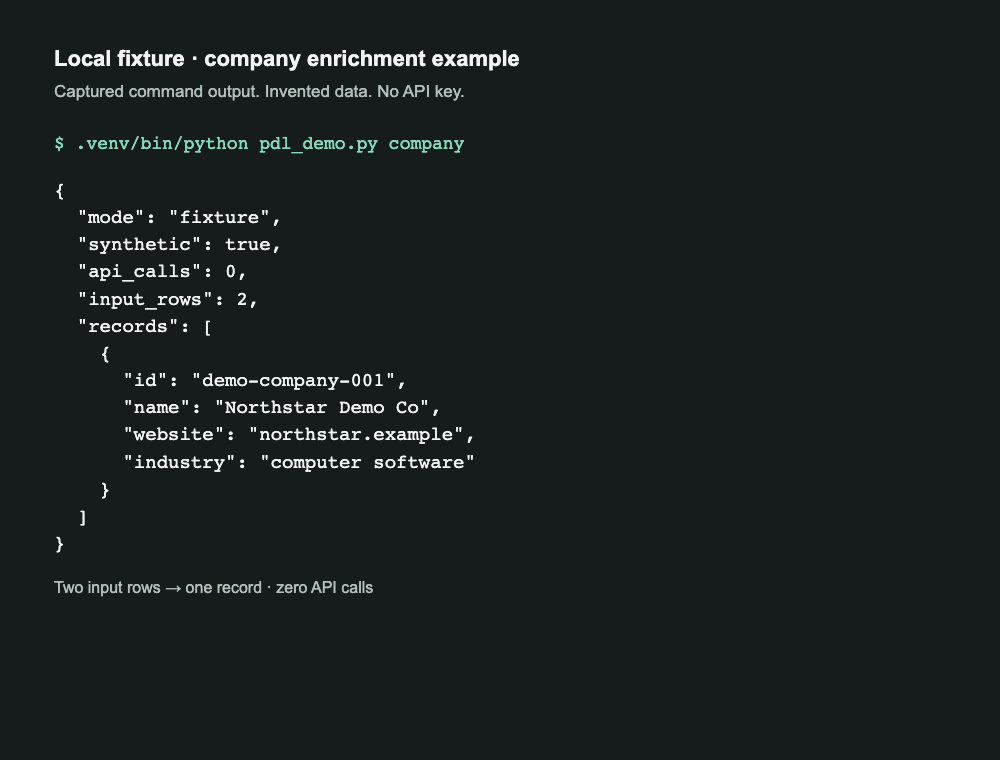
Read the output as text
{
  "mode": "fixture",
  "synthetic": true,
  "api_calls": 0,
  "input_rows": 2,
  "records": [
    {
      "id": "demo-company-001",
      "name": "Northstar Demo Co",
      "website": "northstar.example",
      "industry": "computer software"
    }
  ]
}
Try the person fixture next:
.venv/bin/python pdl_demo.py personIt returns Alex Example’s invented name, job title, company name, and ID. The tool does not request phone numbers, email addresses, home addresses, birth dates, or sensitive personal traits.
Deduplication means removing repeated records. Here, it happens after reading the fixture. It proves the output rule; it does not save credits on calls you have already made.
Keep the key out of the conversation
Do not paste an API key into chat, code, a URL, a screenshot, or a shell command. A private repository is not a secret store.
For a one-run test, the starter uses Python’s hidden terminal prompt. Run it yourself in an interactive terminal. The key exists in that process while the request runs. The script does not save it or accept it as a command-line argument.
Use macOS Keychain for repeat use
Open Keychain Access yourself. Select your login keychain, then choose File → New Password Item. Use skilltrade-pdl for the item name and pdl-api for the account. Put the key in the password field and save it.
The starter’s optional --credential keychain mode looks up that exact item. If macOS asks for access, review the requesting process and approve only that use. Avoid “Always Allow.” The starter does not change the item’s access rules.
Do not run a bare Keychain lookup in an agent terminal: the system utility can print the password. The starter captures it inside the Python process. Keychain protects stored secrets; it does not make a script you run trustworthy. Review the script and who can edit it.
Keep credential entry outside an agent-controlled or recorded session. A key that stays out of chat still has to reach PDL to authenticate a request. Only you should start that step after reviewing its scope.
Approve one sandbox request at a time
PDL’s person and company sandbox endpoints return artificial records and do not use credits. They still use an API key. The documented default sandbox limit is five calls per minute. Check PDL’s sandbox reference before testing.
The starter uses the exact company and person selectors from PDL’s sandbox examples. Those names can look real; they are sent only to the sandbox host. They are separate from the invented local fixture above.
For your first authenticated test, approve this scope: one company enrichment request, sandbox only, four selected fields, no retry, no saved response, and no production call. Then run this yourself:
.venv/bin/python pdl_demo.py company --mode sandbox --approve-sandboxThe terminal asks for the key without echoing it. To use your saved macOS item instead, add --credential keychain. That reads the stored value for this run. Saving a key does not by itself approve a request.
A separate person test uses person in place of company. Each run needs its own decision. Wait between tests and stop on an error. A missing match can reflect the sandbox sample; it does not establish production coverage.
What the transport guard changes
The pinned SDK’s GET method adds the key to the query string and sets no timeout. This starter keeps the SDK’s request validation, then replaces that transport within the one-process command.
- Send the key in the
X-Api-Keyheader. - Allow only the two sandbox enrichment URLs.
- Use a five-second connection timeout and a twenty-second read timeout.
- Do not follow redirects or retry. Ignore inherited proxies and .netrc credentials.
- Disable library logging and print safe error messages, never raw exceptions or responses.
The timeout is a connection/read bound, not a total wall-clock deadline. This guard is tied to SDK 6.4.0 and is meant for a single-process CLI. Retest it before upgrading or embedding it in a concurrent service.
Set the budget before adding real data
The downloadable starter has no production mode, bulk request, or search command. That keeps this lesson small enough to inspect. Search is a separate step because one request can return many records.
- Fixture: learn the local path
- No key, no PDL request, invented records. Safe to use in this guide’s screenshots.
- Sandbox: test the connection
- One approved request per run. Artificial person or company data. No PDL credits consumed.
- Production: approve a new scope
- Confirm your plan, credit balance, overage settings, permitted inputs, fields, and retention rules first. This starter cannot make that call.
Before any future production tool runs, agree on a maximum number of calls and credits for the whole job. A one-call limit resets when a new process starts; it is not an account spending cap.
Deduplicate approved inputs before a request. Normalize company domains and keep a private record of completed work. Use PDL record IDs to merge results after a match. Do not merge people just because their names match.
If you later add search, begin with size=1, one page, and no automatic pagination. A small result size alone is not a credit budget. Check your plan’s charge rules, then record actual usage from the response.
PDL reports credits spent in x-call-credits-spent. Its rate limits are separate from credit limits. Treat 402 and 429 responses as stops to inspect, not a reason for an agent to keep trying. Account allowances vary; use the dashboard and PDL’s usage-limit documentation.
Give both agents the same narrow job
Open the starter folder in Codex or Claude Code. Give the agent this instruction:
Read pdl_demo.py and synthetic.json.
Run .venv/bin/python pdl_demo.py company.
Use fixture mode only. Do not read a credential,
change the guard, or make a network request.
Explain the selected fields and duplicate rule.
The CLI is the shared interface. The prompt is a proposed handoff for Claude Code; it was not tested there for this guide. Tool permissions and approval prompts depend on your agent setup. An instruction in chat is not a security boundary.
For an authenticated test, keep the agent on the review side: ask it to explain the exact command, then run that command yourself. Share only the selected synthetic output if you want help reading it.
Before real records enter any model context, decide which fields may leave your computer and whether that use is permitted. An API match is a lead to check, not permission to contact someone or proof that a field is current.
Keep the source close to the code
Official references checked October 9, 2026: Python SDK setup, SDK source, authentication, sandbox overview, and usage limits.
The example proves the local workflow and request guards. It does not measure PDL’s data quality, production cost, or match rate.
Want to hire Ron to help out?
Email Ron